

Nov 27, 2025
-
By Clive
 AI Summary By Kroolo
People lose 90 minutes daily hunting for information that already exists in your systems—that's nearly 400 hours per users annually spent searching instead of doing actual work.
Poor search UX isn't just frustrating—it's costing you real money in lost productivity, duplicated efforts, and missed opportunities. When folks can't find critical documents, they either recreate work that already exists or make uninformed decisions that impact business outcomes.
This comprehensive guide reveals proven design principles that transform clunky enterprise search into an intuitive discovery experience your team will actually embrace.
Learn how to build search interfaces user will trust and use consistently, reducing information retrieval time by up to 70% while improving decision quality and organizational efficiency across every department.

Search UX (User Experience) encompasses every interaction users have with enterprise search systems—from query input to results evaluation to content consumption. Unlike basic search functionality, search UX design focuses on the entire journey: how easily users formulate queries, how quickly they find relevant information, and how seamlessly search integrates into daily workflows.
Effective search UX extends beyond simple keyword matching to include autocomplete suggestions, real-time filtering, contextual snippets, personalized rankings, and intelligent error handling. It considers visual design, information architecture, interaction patterns, and performance optimization as interconnected elements that collectively determine whether user embrace or abandon search functionality.
Modern enterprise search UX also incorporates AI-powered capabilities like semantic understanding, natural language processing, and conversational interfaces. These advancements enable users to ask questions naturally rather than constructing precise keyword queries, fundamentally changing how organizations approach search interface design.
Poor enterprise search costs organizations millions in lost productivity annually. Modern generation expect consumer-grade search experiences that deliver instant, relevant results across all business systems and data sources.
Enterprise search failures extend beyond wasted time. When users can't find critical documents, they recreate existing work, make uninformed decisions, or abandon tasks entirely. Organizations implementing strong search UX design for consumer report 40% productivity gains and significantly reduced operational redundancies across teams.
Consumer search engines have trained people to expect instant, relevant results. Your enterprise search must deliver Google-quality experiences while navigating complex permissions, varied data sources, and organizational hierarchies. Modern ai-powered search bridges this gap through semantic understanding and contextual awareness.
Effective search UX design transforms passive information retrieval into active knowledge discovery. Consumers should explore your organizational knowledge naturally, building intuition about available resources. This discovery experience becomes critical as data volumes grow and enterprise search tools proliferate across business operations.
As covered in our guide on enterprise search architecture, modern systems serve multiple departments with distinct needs. Your search UX must accommodate varying latency requirements, data access patterns, and user sophistication levels while maintaining consistency across the organization.
AI-driven enterprise search introduces conversational queries and generative responses. Your interface must guide users through these new interaction models while maintaining trust through transparency. RAG AI agents exemplify how search experiences blend retrieval with reasoning capabilities.
Distributed teams access enterprise search from various devices and contexts. Your design must adapt seamlessly across screen sizes while maintaining full functionality. This accessibility challenge demands careful consideration of touch targets, visual hierarchy, and progressive disclosure techniques.
People approach enterprise search with distinct mental models shaped by organizational context, permissions awareness, and task urgency. Understanding these cognitive patterns enables intuitive search UX design that matches user expectations.
Users approach enterprise search with specific intent patterns: navigational searches seeking known documents, informational queries exploring topics, and transactional searches requiring actions. Analyzing search logs through enterprise search analytics reveals these patterns and guides interface design decisions.
Known-item searches require direct retrieval with minimal friction—users know exactly what they need. Discovery searches involve exploration and comparison across results. Your search UX design for employee workflows must accommodate both patterns through appropriate result density and preview functionality.
People embed tribal knowledge into search queries, using internal acronyms, project codenames, and team-specific terminology. Your search interface should recognize these patterns while helping new user navigate unfamiliar vocabulary through contextual suggestions and tooltips.
When users see Access Denied messages, they lose trust in search. Design your enterprise search to filter results by permissions preemptively, showing only accessible content. Where appropriate, indicate restricted content exists and provide pathways to request access.
Users searching during crisis response need different interfaces than those doing strategic planning. Time-sensitive contexts demand streamlined, result-focused experiences. Analytical contexts benefit from comparison tools and saved search functionality. Consider these scenarios when designing your search UX.
Power users appreciate advanced query syntax and filters, while occasional users need simple, forgiving interfaces. Your design should progressively reveal complexity—defaulting to simplicity while making advanced features discoverable. This balance ensures broad adoption across experience levels.
The search input box sets expectations for the entire search journey. Strategic placement, real-time suggestions, visual feedback, and natural language support determine whether people engage or abandon search immediately.
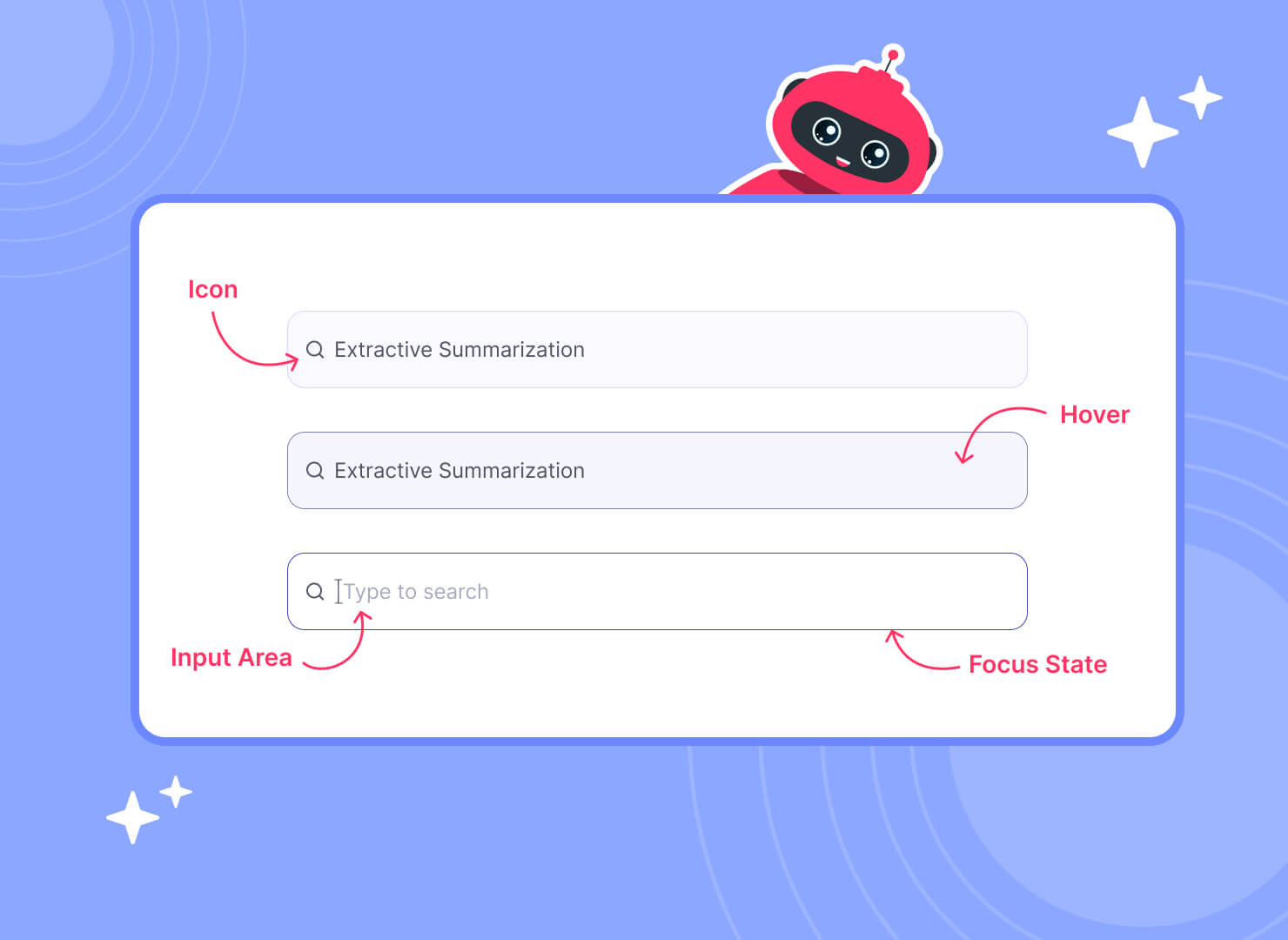
Search inputs belong in consistent, prominent locations—typically top-right or center-top positions. Consider implementing command-style search accessible via keyboard shortcuts for power users. Visibility communicates that search is a primary navigation method, not an afterthought.
Autocomplete suggestions appear after three characters, leveraging fuzzy matching algorithms. Display suggestions showing where matches occur—highlighting matched terms in document titles, content snippets, or metadata. Include recent searches and popular queries to accelerate common workflows.
Users need confirmation their input is recognized. Implement subtle animations on focus, character counting for query length limits, and clear visual states for active search fields. These micro-interactions build confidence and reduce abandonment during the search process.
Global teams require search that handles multiple languages, special characters, and various input methods. Your ai-powered search should recognize language automatically and apply appropriate analyzers. Test thoroughly with international characters to prevent indexing failures.
Modern user expect to ask questions naturally: "What were Q3 sales targets?" rather than "sales targets Q3 2024". Implement natural language processing that interprets intent, not just keywords. Display reformulated queries to build trust in interpretation accuracy.
Allow users to narrow search scope before querying—restricting to specific departments, date ranges, or content types. Position these filters prominently without cluttering the primary search input. Save scope preferences per user to reduce repeated selections.
Results pages must balance information density with scanability. Effective design includes match highlighting, faceted filters, preview functionality, and clear actions—enabling quick evaluation and immediate workflow continuation.
Each result should provide sufficient context for evaluation without overwhelming users. Display title, snippet, metadata (date, author, source), and match highlighting. Optimize for scanning—users typically evaluate results in under two seconds each.
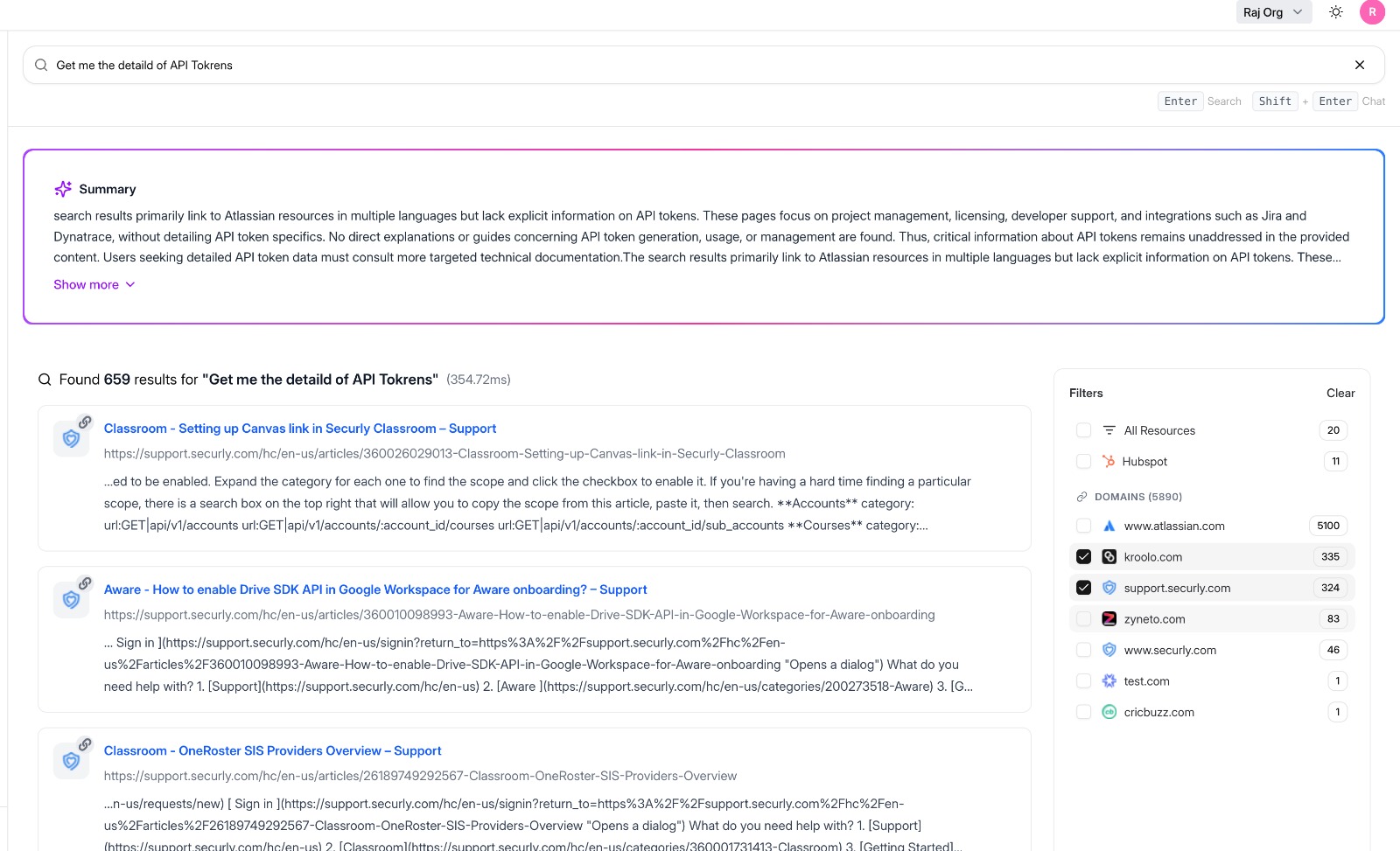
Show where and why documents matched queries through highlighted terms in context. Extract snippets surrounding match locations rather than just first paragraphs. This technique, crucial for effective search UX design, dramatically improves result evaluation speed and accuracy.
Faceted filters enable progressive query refinement through categories like date, author, department, and document type. Display counts alongside filters to indicate result volumes. Applying filters should feel instantaneous—implement optimistic UI updates while results load.
Users need quick actions without opening documents: preview, share, download, add to collections. Implement hover-based quick views showing document content in-context. These preview capabilities reduce friction and context-switching between search and content consumption.
Default to relevance ranking powered by search relevance tuning algorithms, but offer alternative sorts: date, popularity, or alphabetical. Explain ranking factors transparently—users trust search more when they understand why results appear.
Infinite scroll works for exploratory searches where users browse extensively. Pagination suits goal-oriented searches where users need specific results. Consider hybrid approaches: initial infinite scroll with pagination for deep result sets, providing the benefits of both patterns.
When searches return nothing, provide actionable next steps: suggest alternative terms, check spelling, broaden date ranges, or remove filters. Display related content based on partial matches. Never leave users stranded with "No results found" alone.
Implement fuzzy matching that tolerates common typos and phonetic variations. Display "Did you mean?" suggestions prominently. Your AI-driven enterprise search should learn from correction patterns, improving suggestions over time through machine learning.
When permission boundaries affect results, communicate transparently. Show counts of restricted results without exposing titles or metadata. Provide "Request Access" workflows where appropriate. This approach maintains security while reducing frustration from invisible results.
Search latency degrades user experience rapidly—100ms feels instant, 1000ms feels sluggish. Implement progressive loading for metadata first, then content enrichment. Display partial results immediately while remaining results load asynchronously in the background.
Mobile search demands simplified interfaces with larger touch targets and reduced information density. Implement voice search for hands-free operation. Ensure filters collapse into mobile-friendly menus. Test thoroughly on actual devices, not just browser emulators.
For mobile users experiencing connectivity issues, implement graceful degradation. Cache recent search results locally. Display clear offline indicators. Queue searches for execution when connectivity returns. These patterns maintain workflow continuity despite network instability.
AI-powered enterprise search delivers semantic matching, conversational queries, behavioral personalization, and collaborative features. These advanced capabilities elevate search from simple retrieval to intelligent assistance that learns and adapts continuously.
Traditional keyword matching struggles with synonyms and context. Semantic search, powered by vector embeddings, understands intent and relationships. Users searching "budget constraints" also find documents mentioning "financial limitations" without explicit keyword matches, delivering more comprehensive results.
Enable conversational queries: "Show me contracts expiring this quarter" instead of "contracts expire date:2024-Q4". Your interface should display interpreted queries back to users, building trust in the ai-powered search interpretation. Allow manual query editing when interpretation misses the mark.
Learn from individual search patterns, frequently accessed documents, and department affiliations. Surface personalized results are higher in rankings. Implement "More like this" functionality based on document similarity. Balance personalization with diversity to prevent filter bubbles.
Show which documents colleagues frequently access or recently viewed. Implement sharing and annotation within search results. Display expert identification—surfacing colleagues knowledgeable about topics. These social signals, tracked through enterprise search analytics, improve collective knowledge discovery.
Advanced users benefit from command palettes combining search with actions. Type "/" to open command search, then search and execute operations: "create project proposal," "share Q3 report with marketing." This pattern blends search with workflow automation seamlessly.
Your search system should improve through use. Track which results users click, how long they spend on documents, and refinement patterns. Feed this data back into ranking algorithms. Communicate improvements to users: "Search results improved based on team feedback."
Successful enterprise search demands ongoing refinement based on quantitative metrics and qualitative insights. Track click-through rates, zero-result queries, and user satisfaction to identify friction points and prioritize improvements.
Track time-to-first-click, zero-result search rates, refinement frequency, and result abandonment. Monitor search-to-action conversion: how often do searches lead to document opens or workflow completions. These metrics reveal UX friction points more effectively than query volume alone.
Test design variations systematically: result card layouts, filter placements, or relevance algorithms. Run experiments on representative user segments. Measure impact on core metrics like click-through rates and task completion. Statistical significance requires adequate sample sizes—typically thousands of searches.
Quantitative metrics show what happens; qualitative feedback explains why. Implement feedback widgets on results pages. Conduct regular usability testing with actual user. Ask specific questions: "Did you find what you needed?" and "How could this be better?"
Mine search logs for patterns: common queries, failed searches, refinement sequences. Identify knowledge gaps where frequent searches yield poor results. Look for seasonal patterns in search behavior. This intelligence informs both UX improvements and content strategy.
Establish regular review cycles: weekly metric reviews, monthly user testing, quarterly major improvements. Create feedback loops between search analytics teams and UX designers. Document experiments and outcomes. Treat search UX design as an evolving practice, not a one-time project.
Compare your search performance against industry benchmarks: average time-to-result, zero-result rates, and user satisfaction scores. Reference enterprise search use cases to understand sector-specific patterns. Set realistic improvement targets based on peer performance.

Ready to transform your enterprise search experience? Modern AI-driven enterprise search platforms like Kroolo deliver intuitive interfaces backed by powerful semantic search capabilities. Explore how enterprise AI agents and intelligent search work together to revolutionize how teams find and use information. Start your search transformation today.