

Jan 07, 2026
-
By Ivan
“Stop transcribing your briefs and start executing them.”
Most organizations lose the first 48 hours of a project just trying to organize the “ask.”
If your team is still manually copy-pasting requirements from a PDF into a task manager, you’re operating at pre-AI speed.
Here’s the uncomfortable truth: a PDF is often treated like an attachment… when it’s actually the project’s blueprint.
Every new RFP, client brief, or technical spec triggers the same planning grind:
Someone reads 30–50 pages
Opens a project tool like ClickUp or monday.com
Creates task lists and subtasks
Assigns owners
That “setup phase” isn’t planning — it’s expensive admin work.
Now imagine the board builds itself the moment the contract is signed.
Generating a project board from a PDF involves using AI to extract project requirements from the document and convert them into a structured plan, including tasks, subtasks, milestones, priorities, and (ideally) dependencies.
The goal is to move from passive reading to active execution with minimal manual data entry.
What does an “instant board” include?
If you’re serious about eliminating admin friction, the output can’t be a flat checklist. A real board needs structure:
Most teams attempt to do this manually in ClickUp or monday.com. It works—but it costs time and attention, and it scales poorly.
Creating a project board from a PDF is slow because teams manually translate unstructured text into structured tasks, owners, due dates, and dependencies—often across multiple tools.
This “translation gap” causes kickoff delays, errors, and missed requirements. According to the American Psychological Association, switching also adds cognitive overhead, reducing speed and accuracy.
The “Planning Bottleneck” in plain terms
For Project Directors, Agency Owners, and Ops leaders, the bottleneck is rarely execution—it’s intake:
This is the Translation Gap: strategy is locked in a PDF, execution lives in a project board, and humans do the slow, error-prone conversion in between.
Why this hurts more than it looks
According to the American Psychological Association, Task switching and constant toggling between documents and tools has measurable costs. The APA summarizes research showing that switching tasks reduces efficiency because it takes time to “shift mental gears.”
Even McKinsey & Company has also highlighted that knowledge workers spend significant time searching for information—time that can be reduced when information becomes more searchable and usable for collaboration.
Legacy project management platforms like Monday, Asana, ClickUp, and Jira were designed for manual task creation, not intelligent document processing. They treat PDFs as static attachments rather than actionable data sources, forcing users to perform manual transcription with no AI-powered extraction or automation capabilities.
The current market leaders weren't built for document-driven project creation. Here's how they fall short:
Monday.com, Asana, and ClickUp all handle PDFs the same way:
These platforms were architected in the 2010s when "AI" meant basic automation rules. Gartner's 2024 Magic Quadrant for Project Management notes that incumbent tools struggle with unstructured data ingestion—they can track work but can't create it from raw documents.
Common Workarounds That Fall Short
A) OCR Tools + Zapier
What it does: Extracts text from PDFs and sends it to your project management tool via API.
Problem: Lacks understanding of context, priorities, or task structure.
Result: You end up with a “wall of text” that still requires hours of manual organization.
B) ChatGPT + Copy/Paste
What it does: Summarizes PDF content using ChatGPT, then manually enters tasks into your board.
Problem: Constant context switching between multiple tools slows workflow.
Result: Each workflow can take 20–30 minutes and is prone to transcription errors.
C) Notion AI + Manual Transfer
What it does: Uses Notion AI to parse the PDF, then rebuilds tasks manually in your project tool.
Problem: Requires double data entry and juggling multiple systems.
Result: Information exists in two places, creating a synchronization nightmare and increasing the risk of missed tasks.
Bottom line: These workarounds save some time but don’t solve the core problem: moving from a static PDF to a fully structured, actionable project board without losing context or efficiency.
Project managers often receive PDFs, RFPs, technical specs, or internal docs packed with project-critical information. The challenge is turning them into a live, actionable board without wasting hours. Kroolo AI solves this by automatically converting knowledge into structured boards.
Here’s a practical 5-step workflow specifically for PMs:
Scenario: You are a project manager at a digital marketing agency. Your client sends a 20-page PDF brief for a Q2 Product Launch Campaign, containing:
Campaign objectives
Deliverables (social posts, email templates, landing pages)
Timeline and deadlines
Approval workflow
Team responsibilities
You need to turn this PDF into an actionable project board quickly. Here’s how Kroolo AI helps:
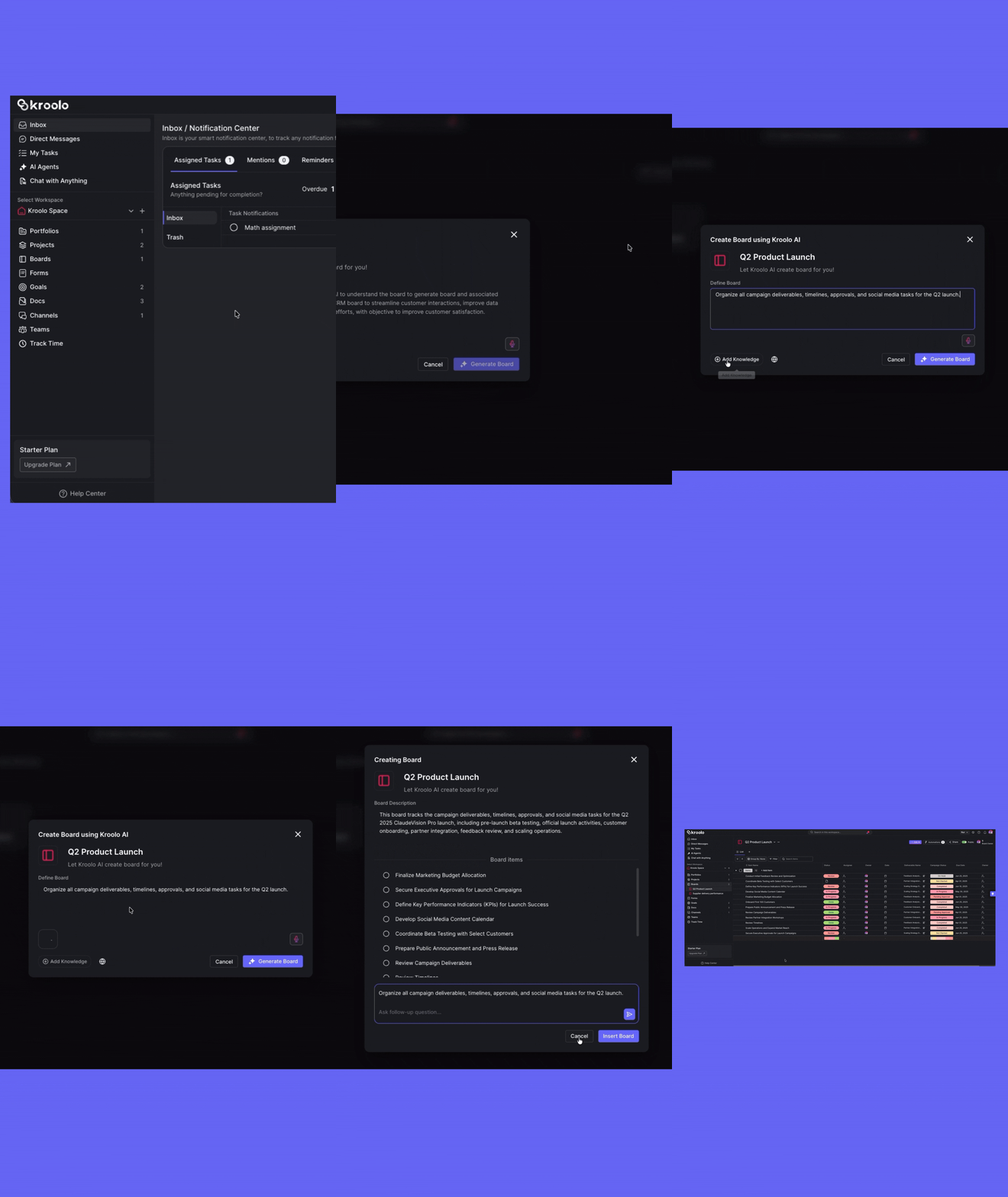
Go to Boards → Create Board → Use Kroolo AI.
Choose to generate a board for the “Q2 Product Launch Campaign”.
Board Name: “Q2 Product Launch – AI Generated”
Description: “Organize all campaign deliverables, timelines, approvals, and social media tasks for the Q2 launch.”
Attach the 20-page client PDF to the Knowledge Base.
Upload supporting docs: creative brief spreadsheet, campaign calendar, and approval workflow doc.
Add any existing boards or links for reference (e.g., past campaigns).
Click Generate Board. Kroolo AI automatically creates:
Click Insert Board.
Review the generated tasks, adjust owners or deadlines if needed.
Track the campaign live:
Ask AI: “Which tasks are overdue?” → AI highlights delayed tasks.
Ask AI: “Summarize the Design workstream” → AI gives a concise overview.
Your entire project board is live, interactive, and actionable, all derived from the original PDF in under a minute.
Result: Within minutes, the client brief PDF is now a structured, actionable project board with tasks, subtasks, dependencies, and assigned roles — eliminating hours of manual setup.
Traditional project management tools can manage tasks and store PDFs, but they don’t automatically turn documents into actionable boards.
ClickUp / monday.com: Can store PDFs and manage tasks, but rely on humans to extract requirements and create tasks/subtasks. Setup is manual and slow.
Notion: Centralizes documents, but all task creation still needs manual effort.
Slack: Captures conversations and decisions, but does not structure execution.
Kroolo’s advantage: It automates PDF-to-board conversion, generating tasks, subtasks, priorities, and dependencies instantly — letting project managers kick off projects faster with less admin overhead.
| Capability | ClickUp / monday.com | Notion | Slack | Kroolo |
| PDF treated as blueprint | Mostly manual | Manual | N/A | ✅ Yes (Prompt-to-Project) |
| Instant task + subtask generation | Limited / requires setup | Manual | ❌ No | ✅ Native AI generation |
| Dependency suggestions | Often manual | Manual | ❌ No | ✅ AI-assisted context (review + refine) |
| Fast kickoff standardization | Depends on templates | Depends on discipline | ❌ Not designed for this | ✅ Designed for intake velocity |

Why this matters for project managers:
Planning drag is real. Multitasking and switching between documents and tools reduces efficiency. (APA)
Tools like ClickUp or monday.com still require hours of manual work to translate PDFs into actionable workflows.
Kroolo removes this bottleneck, letting PMs spend time executing projects rather than setting them up.
✅ Takeaway: If you’re tired of wasting hours manually converting client briefs, RFPs, or technical specs into tasks, Kroolo offers a faster, smarter, AI-driven alternative.
Conclusion
Manual project setup is a hidden cost for project managers. Every hour spent transcribing client briefs, RFPs, or technical specs is time lost on strategy, execution, and team alignment. Traditional tools like ClickUp, monday.com, Notion, or Slack can manage tasks—but they cannot transform PDFs into structured boards automatically.
With Kroolo AI, your PDFs are no longer static documents—they become live, actionable project blueprints. Tasks, subtasks, priorities, dependencies, and suggested owners are generated in seconds, letting PMs move from planning bottlenecks to fast, accurate project execution.
Whether it’s a client campaign, product rollout, or internal SOP, Kroolo ensures your projects kick off smoothly, stay organized, and scale efficiently.
Stop wasting time on admin work—start executing smarter. Upload your PDF and see your project board come to life in minutes with Kroolo AI.
Sign up with Kroolo NOW!