

Most teams know they should document processes. Very few actually enjoy doing it.
Writing Standard Operating Procedures (SOPs) is one of those tasks that managers keep pushing to "next week" because it feels slow, repetitive, and disconnected from real work.
So processes stay undocumented, knowledge stays trapped inside people's heads, and teams end up repeating the same mistakes.
The good news? AI is changing that completely.
Today, you can use AI not only to draft SOPs or generate project scope faster — but to generate them directly from the way your team already works.
That's exactly where AI-powered workspaces like Kroolo are becoming valuable.
The SOP Problem No One Talks About
Every team has processes. Very few have them written down.
Standard Operating Procedures exist for one reason: so your team doesn't have to reinvent the wheel every time a familiar task shows up. Yet despite this obvious value, SOP creation sits at the bottom of nearly every manager's to-do list.
The result? Inconsistent output, tribal knowledge that walks out the door with employees, and onboarding that takes twice as long as it should.
The cost isn't just operational — it's measurable.
According to a McKinsey Global Institute report, employees spend an average of 1.8 hours every day — 9.3 hours per week — searching and gathering information.
In practical terms, that means a business effectively loses the full contribution of one in every five employees to information-hunting alone.
A well-maintained SOP library directly attacks this problem. But creating one has always felt like too much work. That's where AI comes in.
Why SOPs Don't Get Written
Before talking about the fix, it's worth naming the problem clearly. SOP creation fails for predictable reasons:
- Time cost feels high
Writing a proper SOP for even one workflow can take hours of documentation work that nobody has budgeted for.
- The tacit knowledge problem
Experts can't always articulate what they do — they just do it. Capturing that in writing is harder than it sounds.
- They go stale fast
A process changes, nobody updates the doc, and the SOP quietly becomes a liability instead of an asset.
- No one loves the task
Documentation is rarely anyone's idea of meaningful work — so it keeps getting deprioritized.
These aren't personal failings. There are structural problems with how SOP creation has always worked. AI changes the structure.
Can AI Write Your SOPs?
Yes — AI Can Write Your SOPs. Here's How Kroolo Does It.
Kroolo's AI Assistant isn't a generic chatbot you prompt from scratch. It's a purpose-built productivity tool that operates inside your workspace — and it can generate a full, structured SOP document in minutes.
A 2023 MIT study found that generative AI tools increased writing speed by 40%, a finding reported by Harvard Business Review.
For SOP creation specifically — a task that combines research, structuring, and drafting — this kind of acceleration is transformative.
Kroolo's AI applies this capability directly to your project documentation workflow through two powerful paths.
How to Use AI to Write Project SOPs?
Here we’ve discussed two methods using AI and AI Agents to get you started:
Method 1: Generate an SOP Instantly with Kroolo AI
This method is ideal when you already know the workflow you want to document and simply need AI to turn it into a structured SOP — quickly and clearly.
Instead of starting from a blank page, Kroolo AI helps you generate a complete SOP draft in seconds.
Step 1 — Choose the Right Workspace
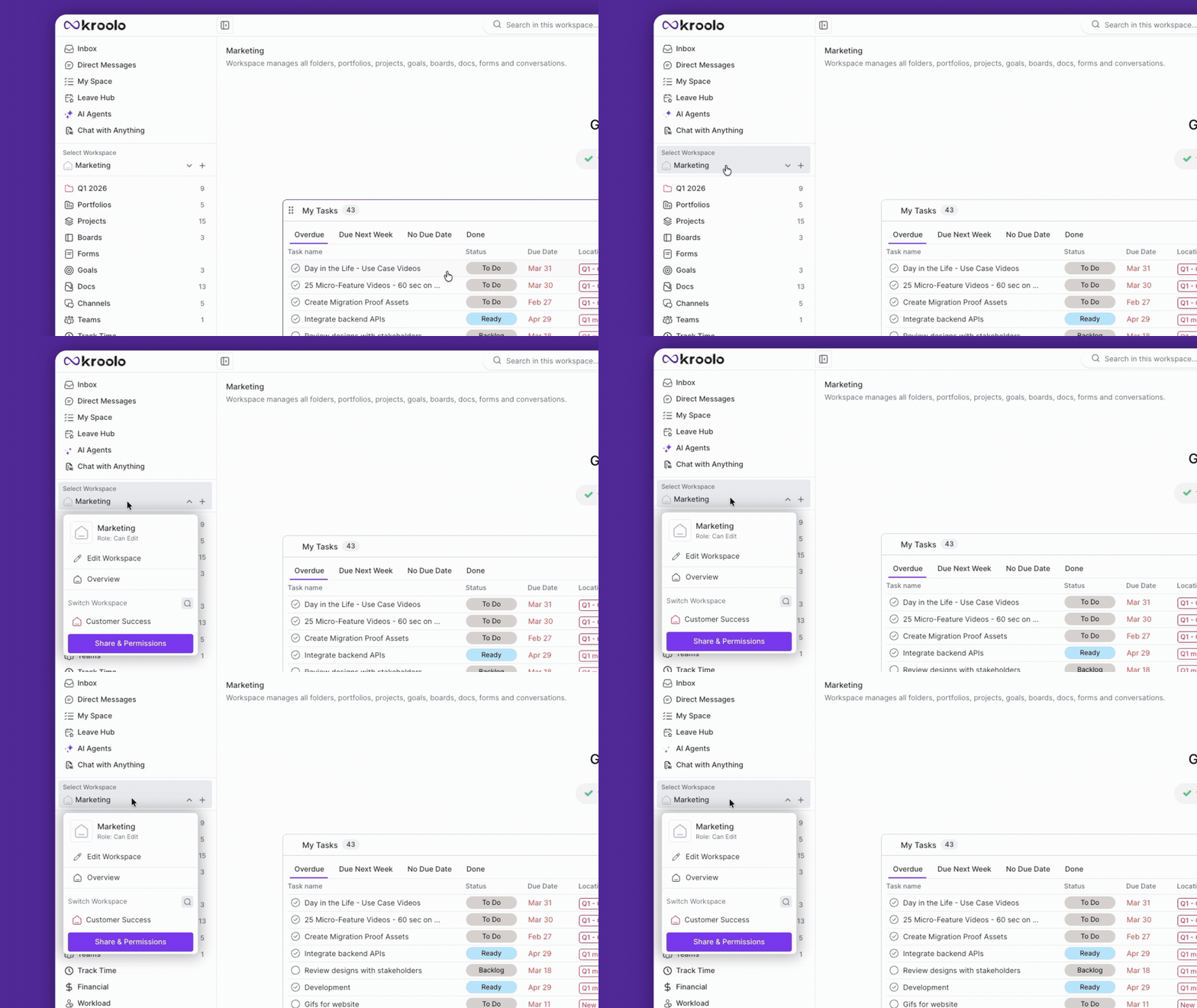
Open Kroolo and select the workspace where the project or workflow exists.
Keeping SOPs inside the relevant workspace ensures:
- Documentation stays organized
- Teams can access it easily
- Processes remain connected to active projects
Step 2 — Open the Docs Section
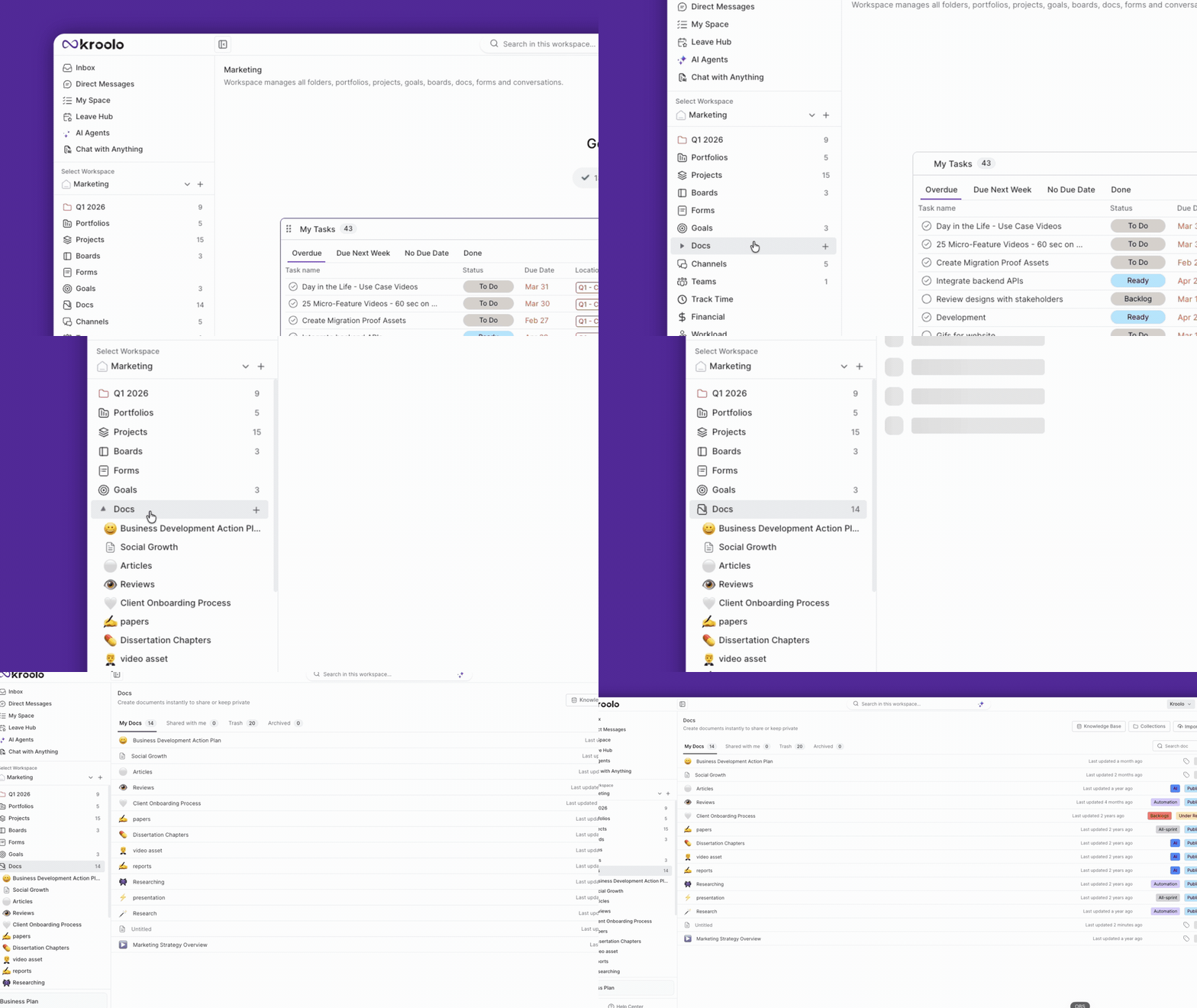
Navigate to the Docs section inside your workspace.
This becomes the central place for:
- SOPs
- Process documentation
- Internal guidelines
- Operational knowledge
Step 3 — Create a New Document
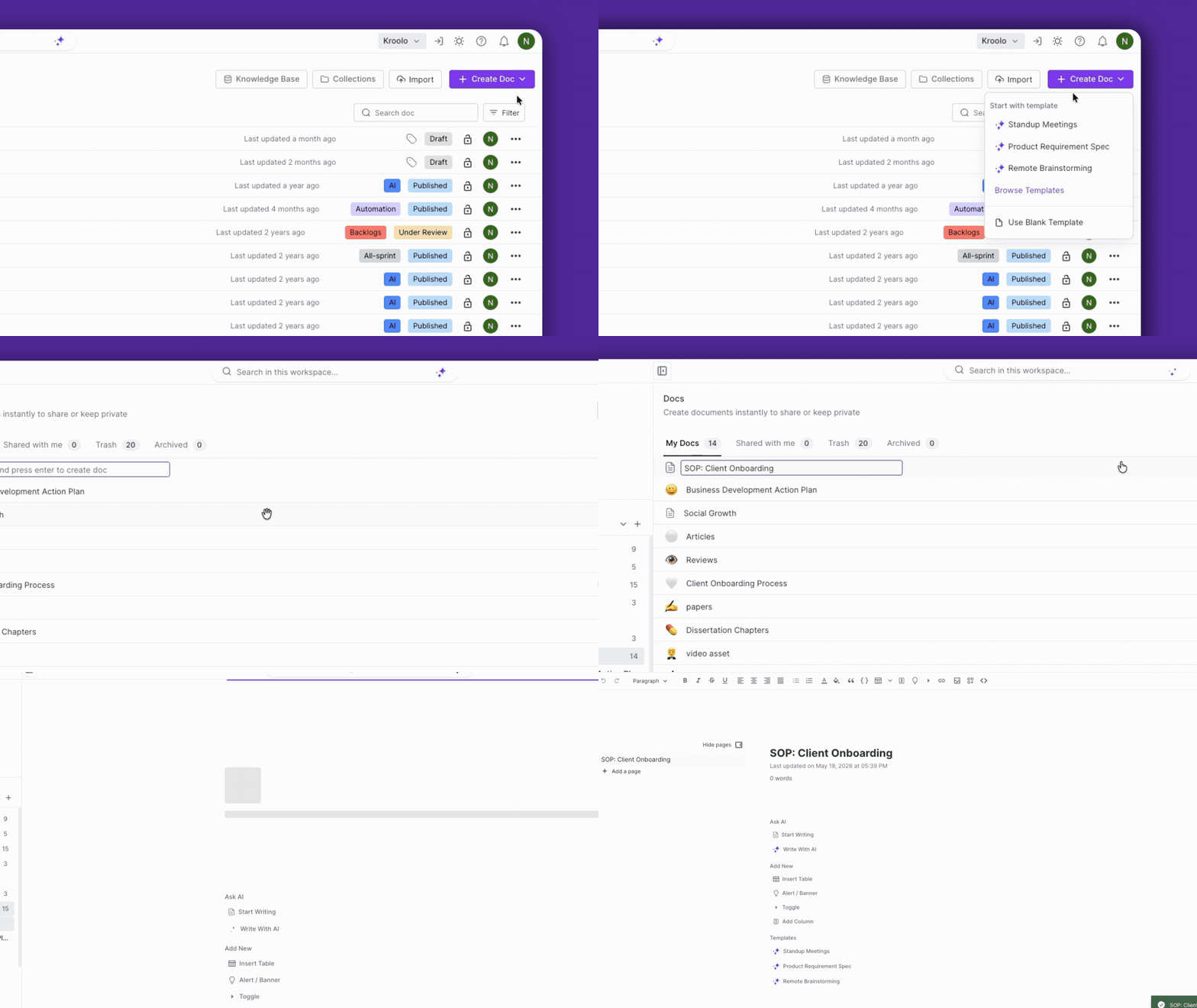
Click on “Create Doc” and enter a title for your SOP.
For example:
- SOP: Client Onboarding
- SOP: Weekly Sprint Planning
- SOP: Campaign Launch Workflow
Press Enter to create the document.
Step 4 — Trigger Kroolo AI
Inside the document, press the spacebar to open Kroolo AI’s prompt window.
This allows you to generate SOP content directly inside the doc without switching tools or tabs.
Step 5 — Describe the SOP You Want
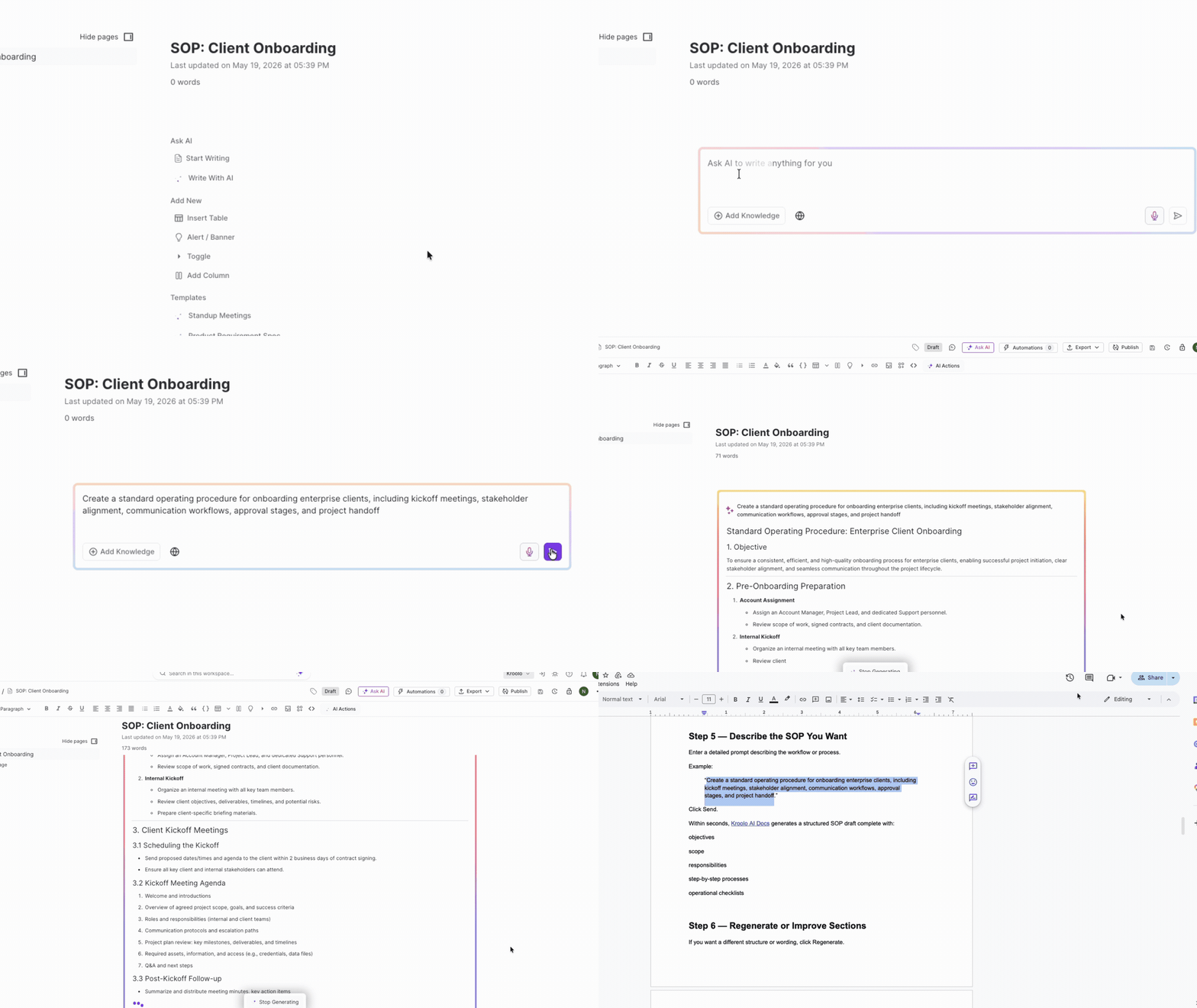
Enter a detailed prompt describing the workflow or process.
Example:
“Create a standard operating procedure for onboarding enterprise clients, including kickoff meetings, stakeholder alignment, communication workflows, approval stages, and project handoff.”
Click Send.
Within seconds, Kroolo AI Docs generates a structured SOP draft complete with:
- Objectives
- Scope
- Responsibilities
- Step-by-step processes
- Operational checklists
Step 6 — Regenerate or Improve Sections
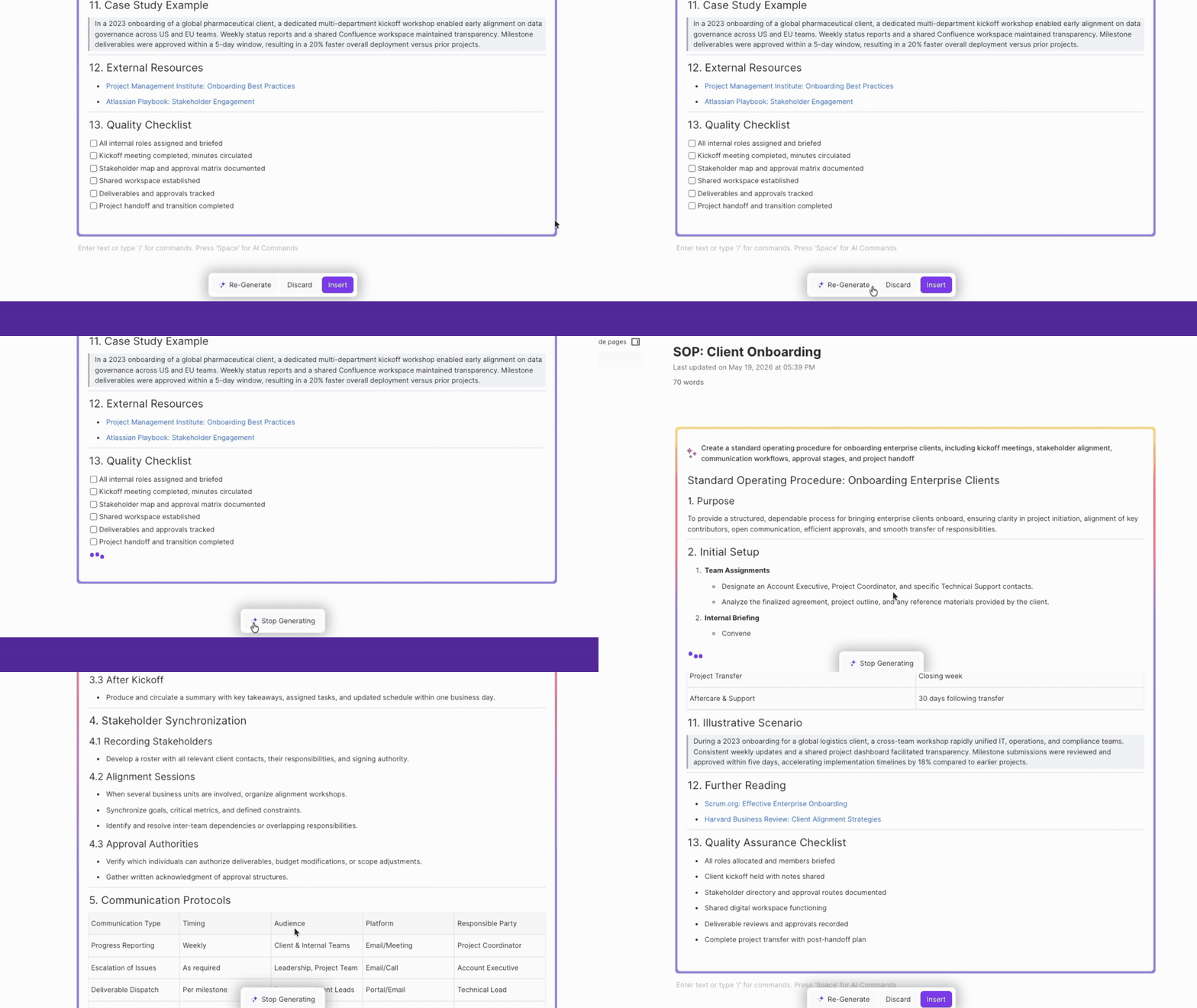
If you want a different structure or wording, click Regenerate.
You can:
- Compare alternate versions
- Discard outputs
- Combine multiple responses
- Refine sections incrementally
This makes SOP drafting significantly faster than rewriting entire documents manually.
Step 7 — Customize Specific SOP Sections with AI
Need to improve a section? Simply highlight any paragraph inside the SOP.
Kroolo AI provides inline editing options like:
- Make Longer
- Shorten
- Regenerate
- Summarize
For example, you can:
- Expand approval workflows
- Simplify onboarding instructions
- Rewrite technical steps more clearly
- Condense repetitive sections
Instead of editing the entire document manually, teams can optimize SOPs section-by-section.
Step 8 — Finalize the SOP
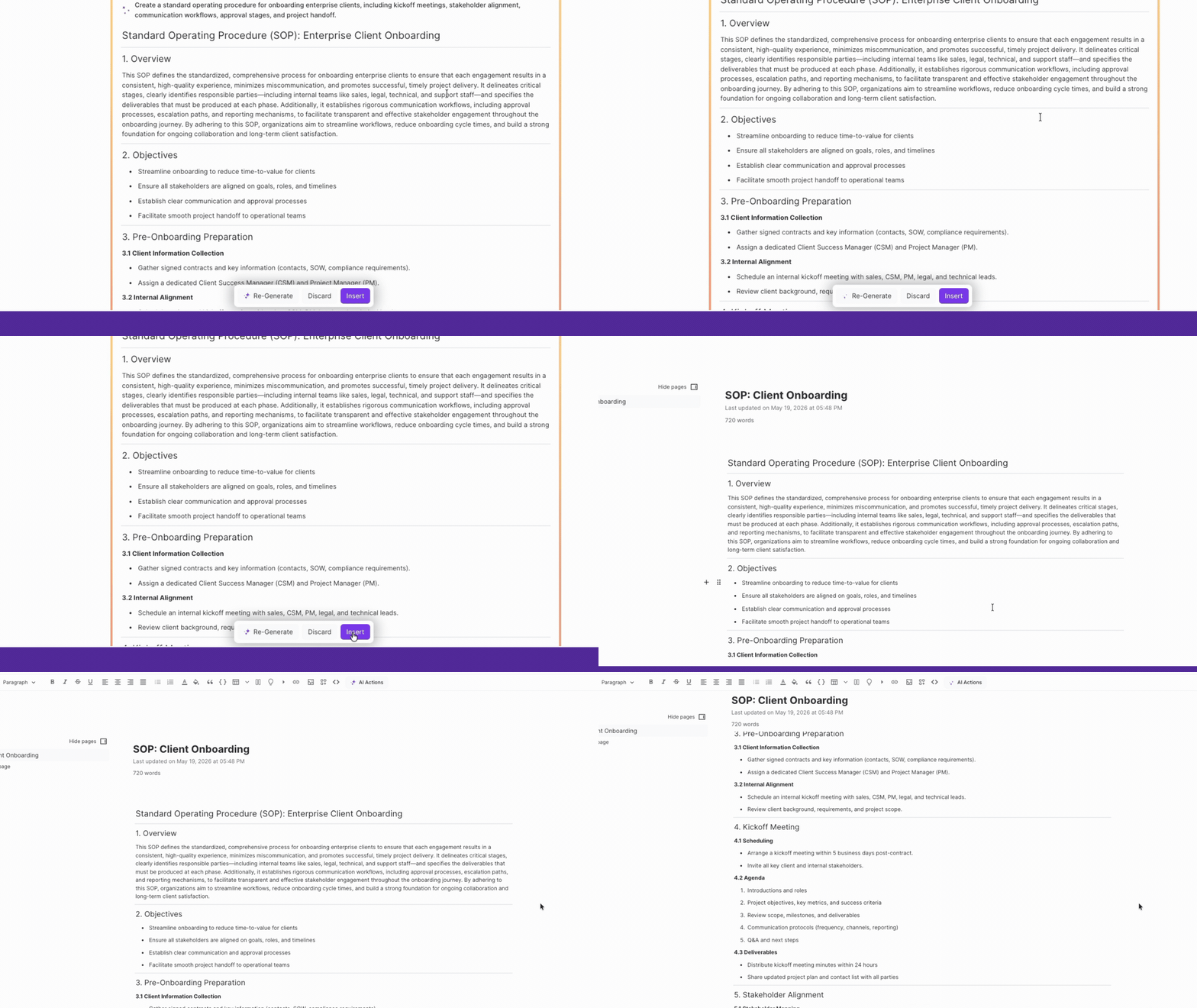
Once the SOP looks complete, click Insert to finalize the content.
Need to add more process steps later?
Simply press the spacebar again and continue generating additional sections using new prompts.
The result is not just a static document — it becomes a living SOP inside your workspace that evolves alongside your projects and workflows.

Method 2: Create Role-Specific SOPs with Kroolo AI Agents
Sometimes SOPs need more than generic documentation.
A marketing team’s publishing workflow looks very different from a developer deployment process or a customer onboarding checklist.
That’s where Kroolo AI Agents become especially powerful.
Instead of generating broad documentation, AI Agents help create SOPs tailored to specific roles, responsibilities, and operational goals.
Step 1 — Open AI Agents
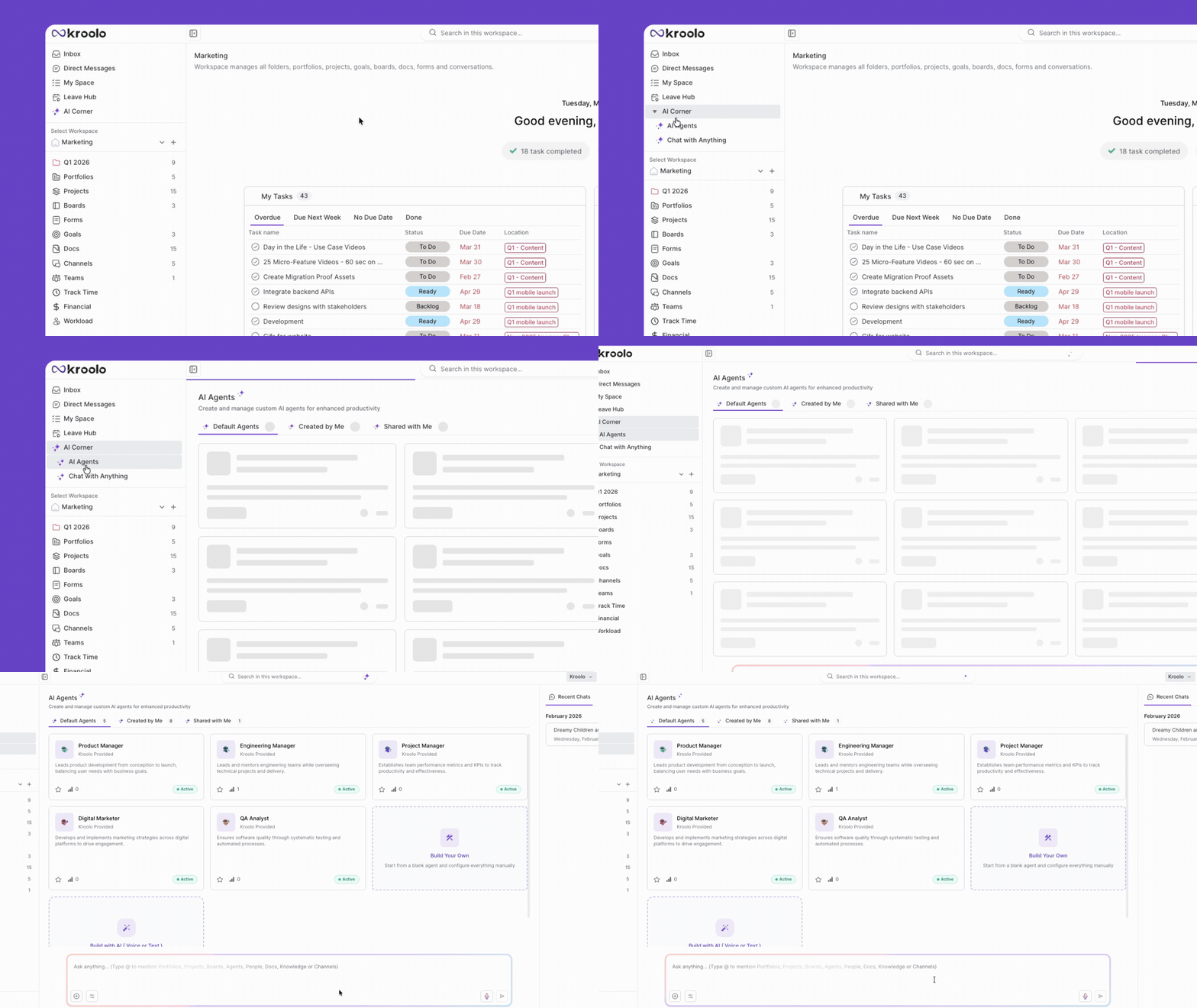
Inside Kroolo Docs, click on AI Agents.
This opens a guided document-generation experience designed specifically for structured workflows and operational documents.
Step 2 — Define the SOP Objective
Enter:
- The SOP title
- The workflow objective
- The process outcome you want documented
For example:
- Content Publishing SOP
- Product Release SOP
- Client Escalation SOP
- QA Testing SOP
Kroolo AI automatically builds a structured prompt framework behind the scenes, removing the need for complicated prompt engineering.
Step 3 — Select Persona and Tone
Choose the role the SOP is intended for:
- Operations Manager
- Content Writer
- Product Owner
- Designer
- Project Manager
- Developer
Then define the tone.
For example:
- Operational and formal for compliance processes
- Collaborative and simple for onboarding workflows
- Instructional for training documentation
Click Generate. Kroolo AI Agents instantly create a complete SOP structure including:
- workflow stages
- responsibilities
- execution steps
- dependencies
- process guidance
Step 4 — Fine-Tune the SOP
Review the generated document and tailor it to your internal workflows.
You can:
- Add missing edge cases
- Insert team-specific procedures
- Adjust terminology
- Refine approval stages
Once finalized, click Create Docs to save the SOP.
Step 5 — Use AI Chat Inside the SOP
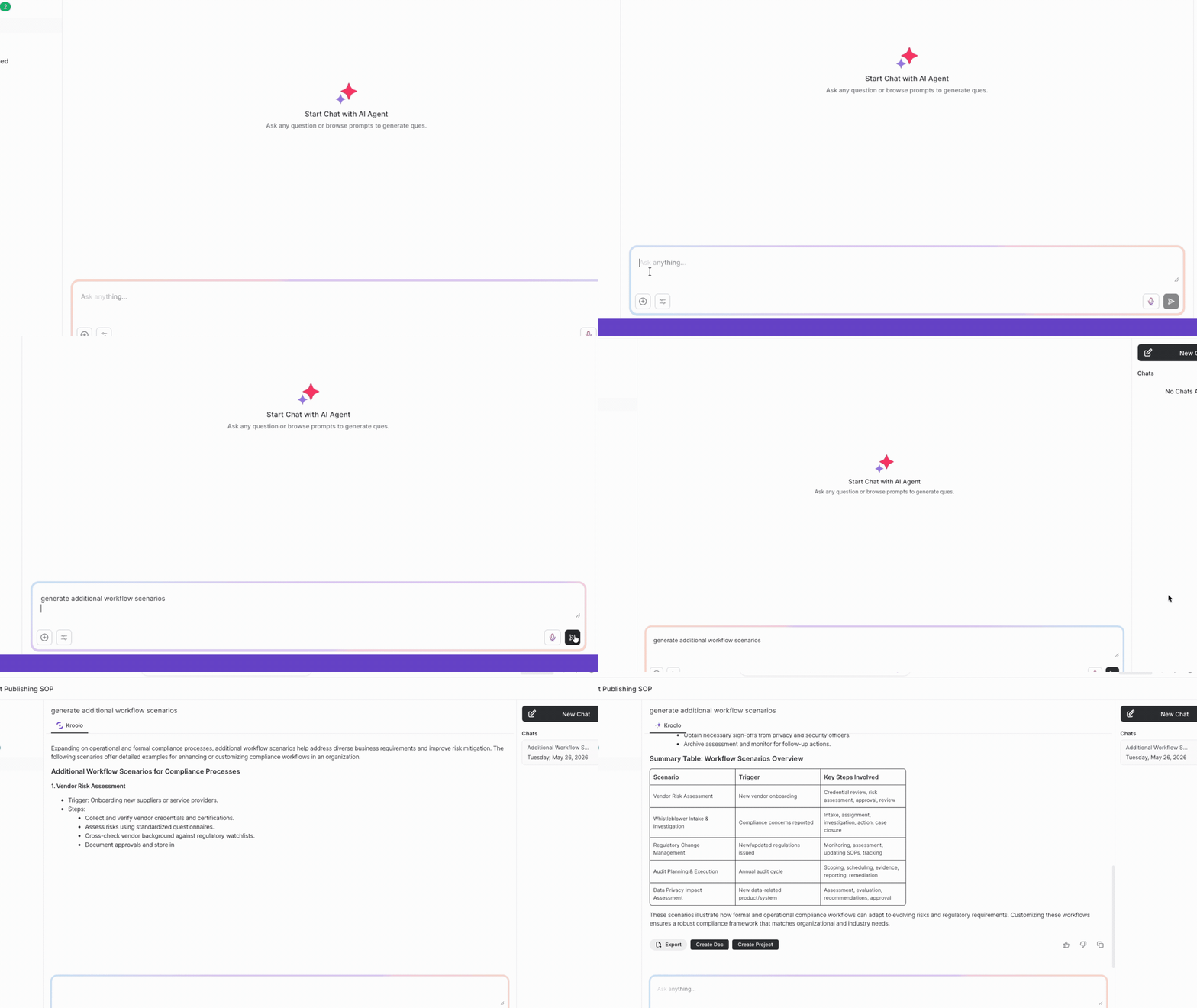
After saving, Kroolo opens an integrated AI chat alongside the document.
This becomes extremely useful for operational refinement.
Teams can:
- Ask questions about sections
- Generate additional workflow scenarios
- Clarify responsibilities
- Expand process details
- Improve incomplete instructions
Instead of rewriting SOPs manually, teams can iteratively improve documentation through AI conversation.
Step 6 — Launch and Share the SOP
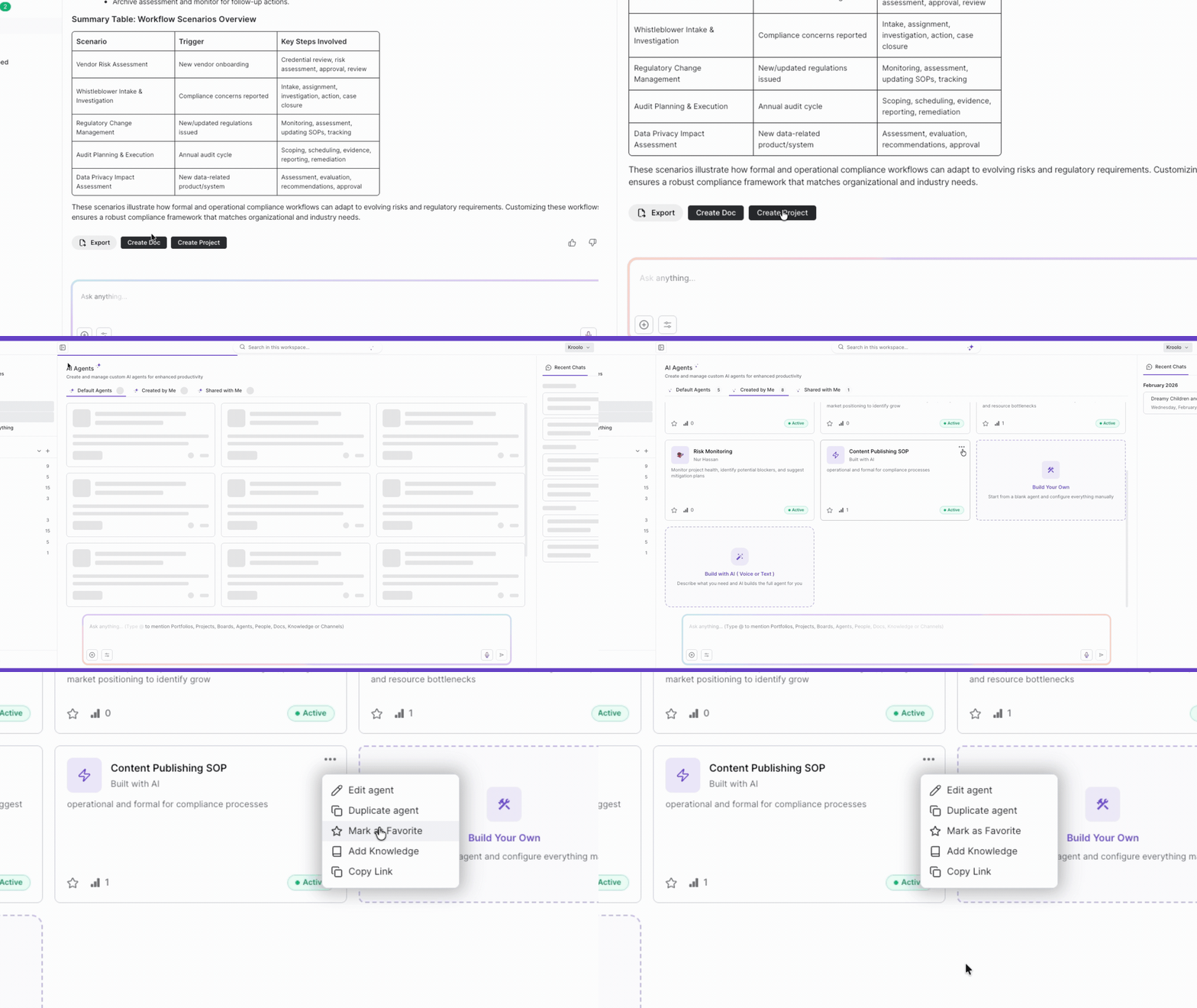
Click on 'Create Doc' or 'Create Project' to open the finalized SOP and share it with your team.
In less than a minute, you have a structured, role-specific, AI-generated SOP ready for execution.
What About Accuracy?
One of the biggest concerns around AI-generated SOPs is accuracy.
But in reality, most manually written SOPs are already incomplete, outdated, or inconsistent.
The advantage of using Kroolo is that:
- The documentation is created inside the workspace
- Workflows stay connected to projects
- Teams can continuously refine processes
- AI accelerates documentation without removing human oversight
AI handles the repetitive drafting.
Your team adds operational judgment, exceptions, and strategic nuance. The result is faster SOP creation without sacrificing process quality.
Instead of spending hours documenting workflows from scratch, teams can focus their time on improving how the work actually gets done.
Stop Documenting Manually. Let AI Do It for You.
SOPs don't have to be the task that never gets done.
With Kroolo's AI, writing a Standard Operating Procedure is no longer a half-day effort that gets bumped to next week. It's a few prompts, a quick review, and a published document — in under a minute.
Whether you use the direct prompt method or build through AI Agents, the result is the same: clear, structured, team-ready SOPs that actually reflect how your work gets done.
The teams that document their processes consistently outperform the ones that don't. Now there's finally a tool that makes consistency effortless.
Your processes deserve to be documented. Your team deserves the clarity that comes with it.
Try Kroolo for FREE now.