
May 15, 2026
-
By Ivan
Your team isn't unproductive. They're just buried.
Buried under 153 Teams messages a day. Buried under 117 emails. Buried under Slack pings, Jira updates, calendar invites, doc comments, and the half-dozen other apps quietly competing for attention every few minutes.
Microsoft's 2025 Work Trend Index found knowledge workers are now interrupted every two minutes during core work hours — roughly 275 times a day.
That's not a productivity problem. That's an attention problem. And the cost shows up everywhere: missed deadlines, ignored decisions, decisions ignored twice because the first ping got buried, and the slow erosion of the trust teams need to actually collaborate.
This is what alert fatigue looks like inside a team. Here's how it happens, what it actually costs, and how to fix it.
The traditional logic of workplace tools was simple: an event happens, send a notification, the human responds. That worked when notifications were rare. At today's volume, it's actively counterproductive.
45% of workplace notifications aren't relevant to the person receiving them. That's not a typo — nearly half of every ping, email, and @mention hitting your team is noise. When that's the baseline, people stop reading carefully.
They scan, swipe, dismiss. And the moment that habit forms, the important notifications get treated the same way.
This is the real definition of alert fatigue: it's not exhaustion from too many alerts. It's the desensitization that happens when your brain learns most alerts can be safely ignored.
Once that conditioning sets in, even genuinely critical messages — a deadline change, a client escalation, a blocker on a launch — slide past unnoticed.
The downstream effects are brutal and measurable.
80% of workers say they don't have enough time or energy to do their jobs effectively because of constant interruptions.
After every interruption, it takes an average of 23 minutes and 15 seconds to fully refocus — but with interruptions arriving every two minutes, most knowledge workers never fully refocus during the workday. They live in a permanent state of partial attention.
The financial damage scales fast. Research cited by Worklenz puts the cost of poor workplace communication at up to $420 billion annually in the U.S. alone, driven directly by missed deadlines, low morale, and reduced productivity.
Teams using effective collaboration practices are 15% more likely to meet deadlines and save an average of 2.5 hours per employee per week — a dividend that compounds across every project on the roadmap.
And then there's the part nobody puts on a P&L: trust. When important messages get missed, people stop trusting the channel. So they re-send them. Then they DM. Then they email. Then they Slack. Then they walk over.
The same information ends up in five places, multiplying the noise that caused the problem in the first place.
Most teams have tried the obvious solutions. None of them really work at scale:
Great in theory. In practice, the person who silences Slack is the same person who misses the urgent client request and gets blamed for it. The incentive is to leave everything on.
Useful, but channel hygiene erodes the moment the team scales past 30 people. Someone always posts in the wrong channel. Someone always @here's when they shouldn't.
Removes one source of interruption while leaving the other forty intact.
Helps individuals. Doesn't fix the system that's generating the noise.
The pattern is clear: every traditional fix tries to change human behavior. The actual problem is the infrastructure — a notification model designed for a world where alerts were rare, applied to a world where they aren't.

The shift happening in 2026 is structural, not behavioral. Modern teams are moving from "alert humans about everything" to "act on what matters, alert on what requires judgment."
That requires AI that understands three things at once: who you are, what you're working on right now, and what's actually urgent versus what just feels urgent.
With that context, the system can do what humans were never going to do at scale — silently filter the 45% of irrelevant noise, batch the medium-priority stuff into a digest, and surface only what truly needs your attention right now.
This is where Kroolo is doing something genuinely different.
Kroolo treats notifications the way they should have been treated all along — as a prioritization problem, not a delivery problem. Instead of forwarding every event to every person, Kroolo gives teams the tools to filter, summarize, and pull information on their terms. Here's how it works in practice.
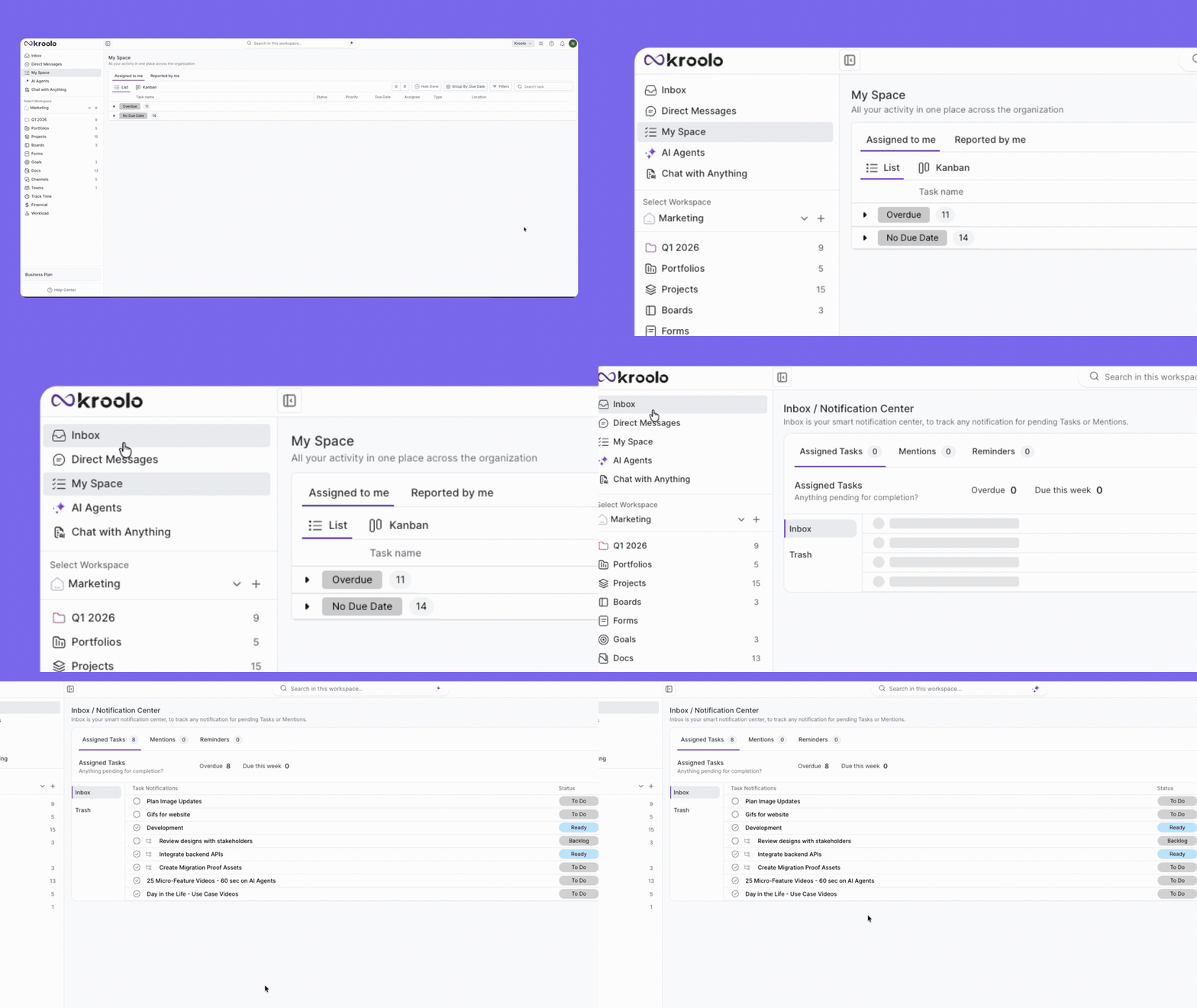
Kroolo's inbox consolidates updates from across your projects, tasks, channels, and docs into a single surface.
Instead of hunting through five tabs to figure out what changed since lunch, you open one view and see everything that's actually directed at you.
No more bouncing between Slack, email, project tools, and doc comments to piece together the day.
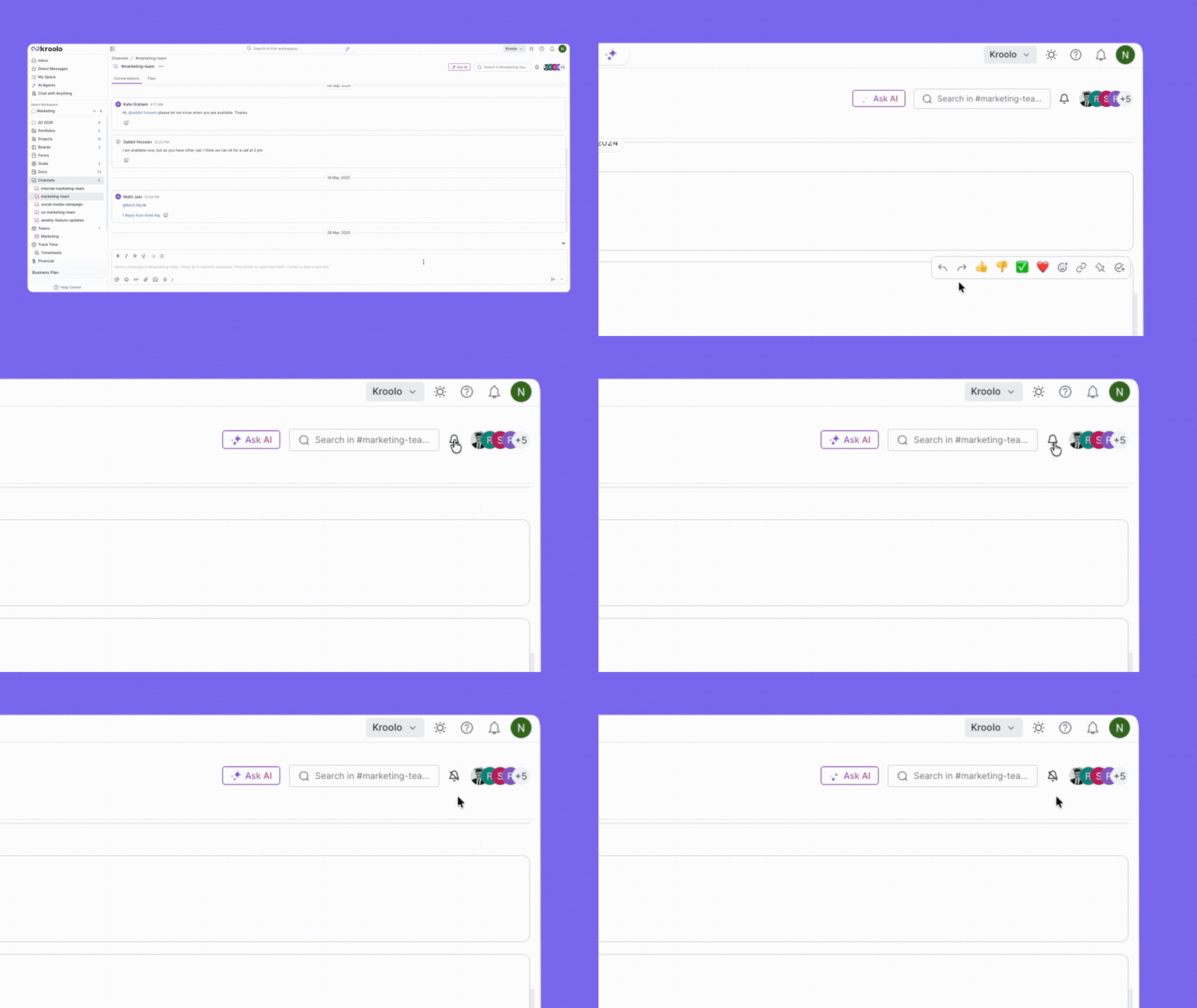
With Manage Notifications and Mute / Unmute Notifications, you decide what reaches you and when. Kill the noise from channels you're observing but not driving.
Keep the alerts on for projects you own. The point isn't to silence everything — it's to make sure the pings that do break through are actually worth breaking focus for.
Generic "High / Medium / Low" labels are why nothing feels urgent anymore. Kroolo lets you build Custom Priorities that reflect how your team actually works — Critical, Blocker, This Sprint, Nice-to-Have, whatever your reality looks like.
When priority labels mean something specific, the team stops treating every task like a five-alarm fire, and the genuinely urgent stuff finally gets the attention it deserves.
Instead of scrolling through every project to figure out your day, My Tasks pulls every task assigned to you into one prioritized view.
You see what's due, what's overdue, and what's coming — without wading through updates that belong to someone else's lane. It's the difference between starting your day in chaos and starting it with a clear list.
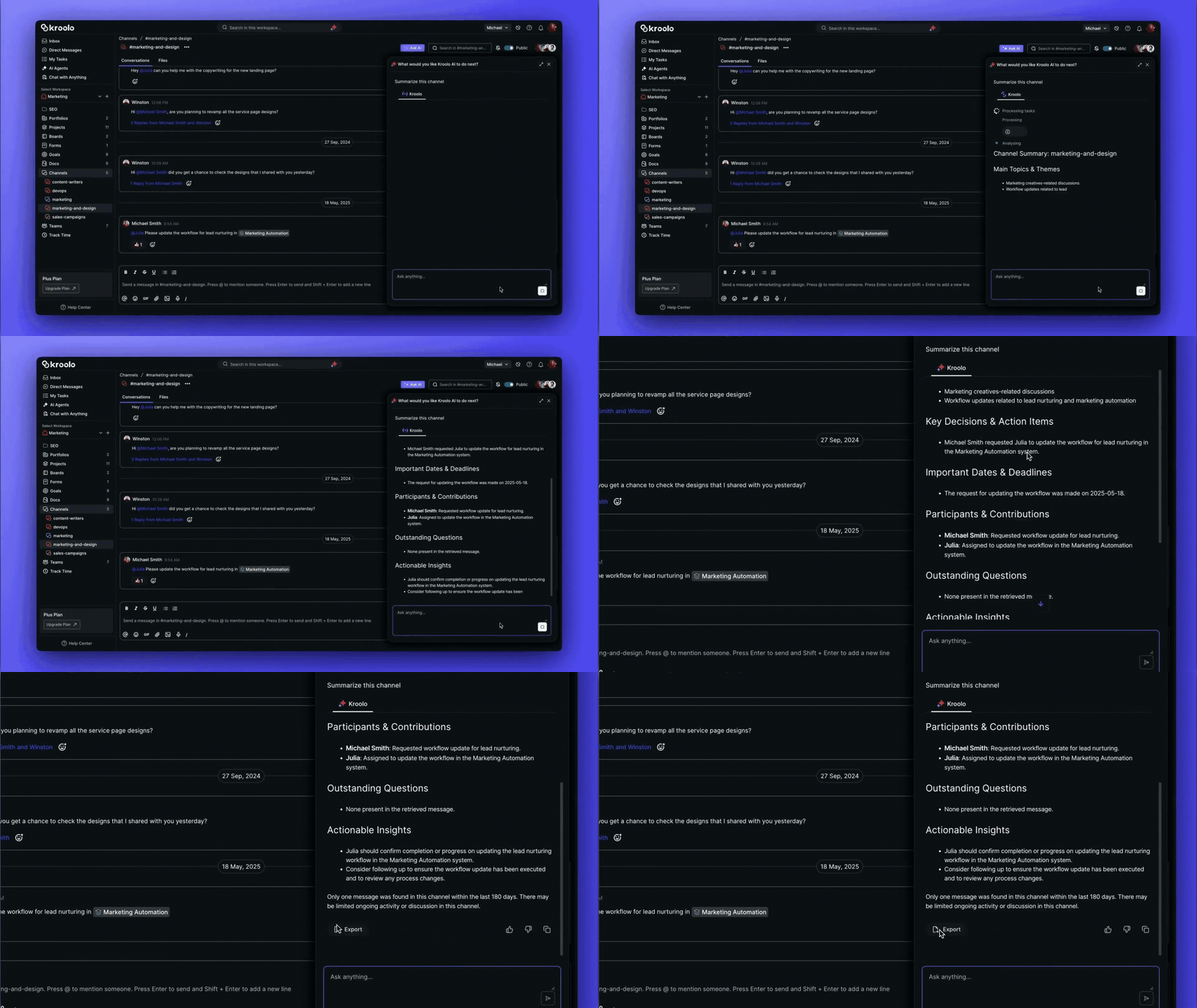
This one's a game-changer for teams using Kroolo Channels. The Summarize Channel feature uses AI to condense an entire thread or channel into the key points, decisions, and action items.
Step away for a meeting and come back to 200 messages? One click and you've got the summary.
The conversation history is still there if you need it — but you're no longer forced to read every reply to find out what was actually decided.
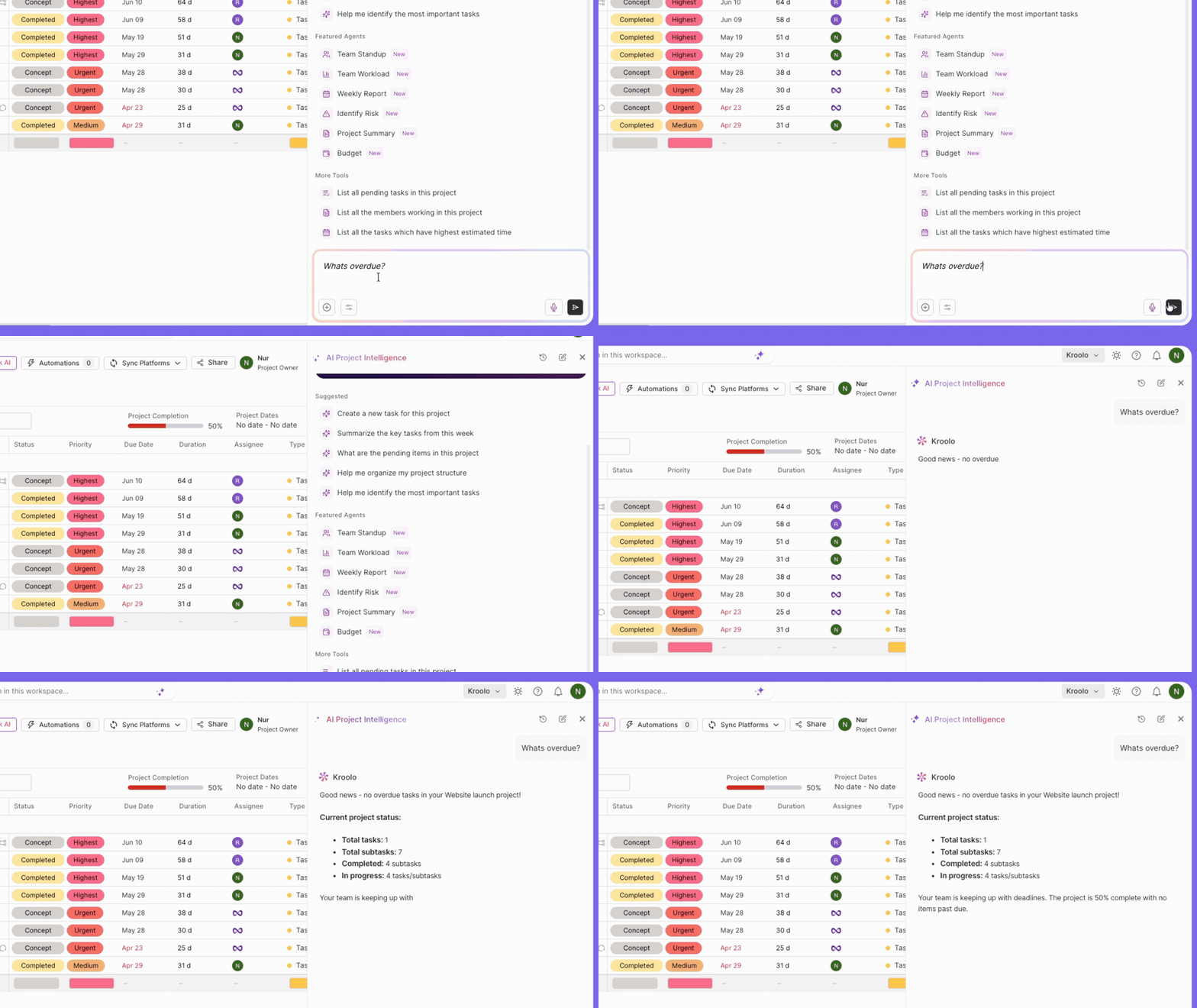
The single most powerful shift in fighting overload: stop being notified, start asking. Kroolo's AI lets you query any project, doc, PDF, image, or spreadsheet in plain English.
You get the answer instantly, sourced from real project data — and you've replaced what would have been a Slack thread, two DMs, and a 30-minute standup with a single AI query.
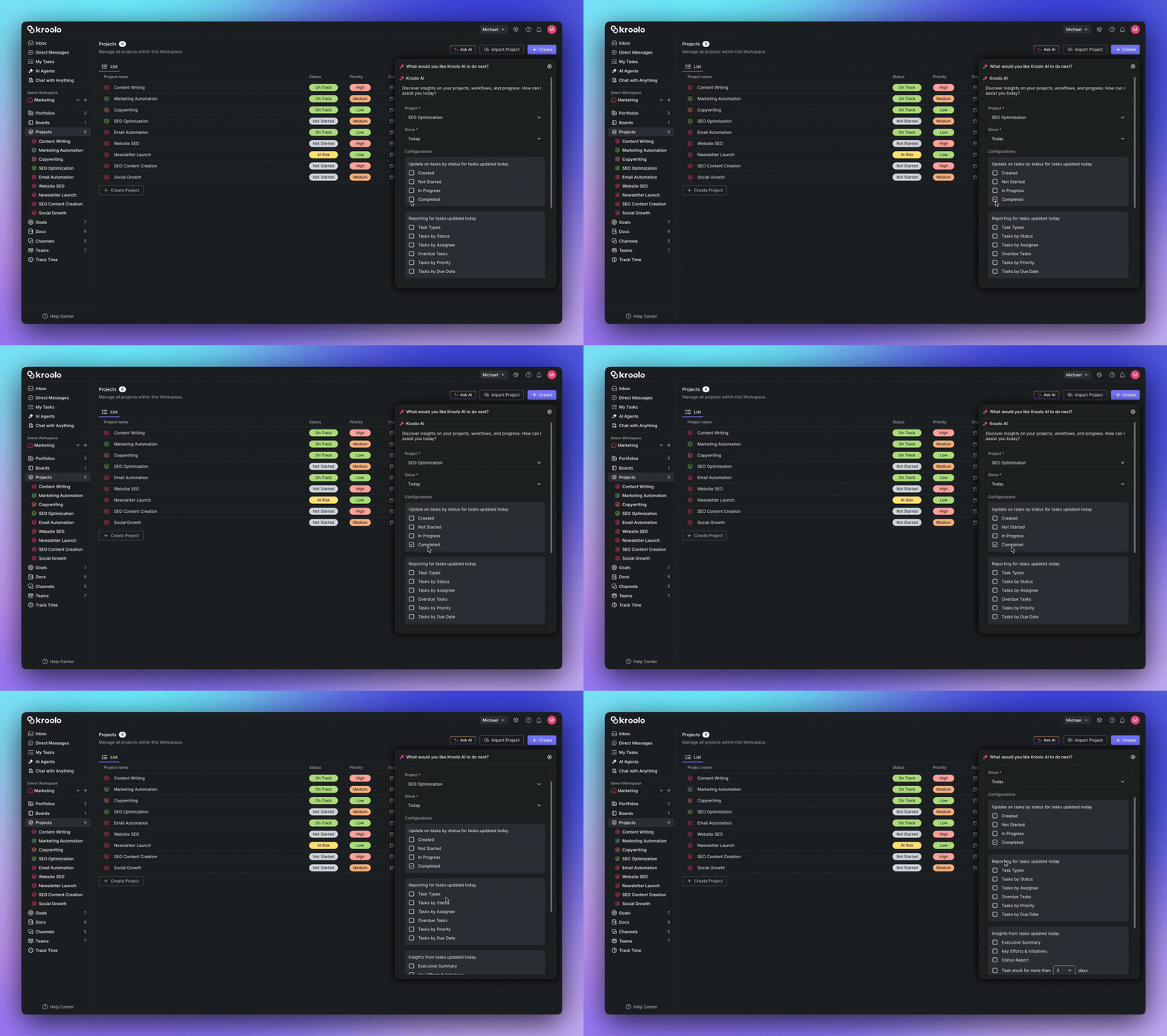
Manual standups exist because nobody trusts that information will surface on its own. Kroolo's AI handles the surfacing for you.
Check Project Updates with AI auto-generates project status — overdue tasks, blockers, risks, recent changes — without anyone having to ask, write, or sit through a meeting. The team stays informed; nobody's day gets carved up.
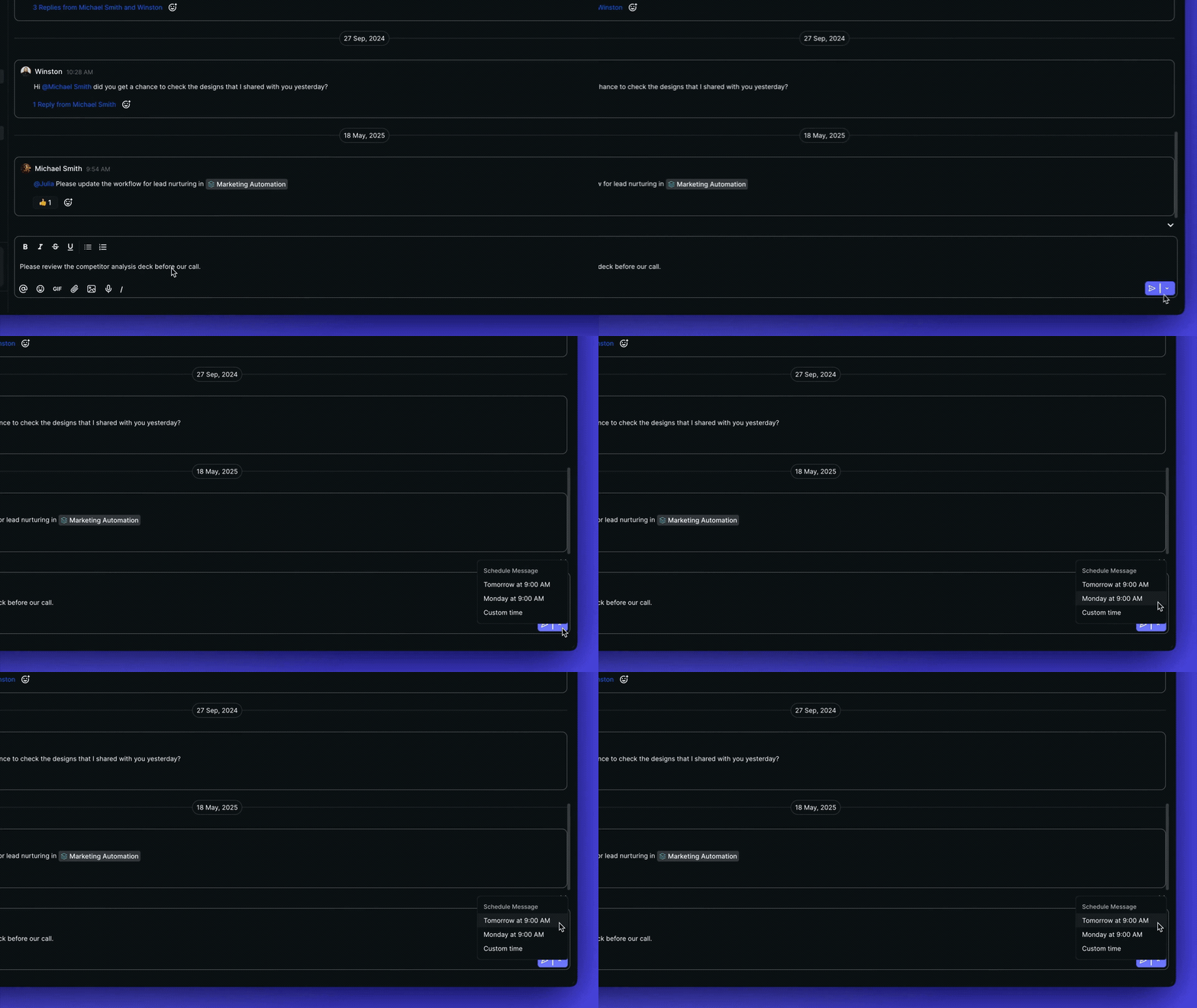
Most overload solutions only think about the receiver. Kroolo's Schedule Messages feature also helps the sender. Got a non-urgent update at 11pm?
Schedule it for 9am tomorrow so it doesn't ping a teammate during their family time. It's a small feature with an outsized cultural effect: teams stop generating after-hours noise, which means everyone's notification volume drops at the source.
Half of notification fatigue comes from the same information arriving in five different apps. Kroolo collapses chat, tasks, docs, goals, sprints, dashboards, and AI agents into one workspace.
A single notification represents a single signal — not the same event echoing across your stack as Slack pings plus email plus Jira updates plus doc comments.
The result: notifications you trust again
When Kroolo pings you, it matters. When it doesn't, you can actually focus. That's the whole point — not silencing your team, but making sure their voice cuts through only when it should.
Conclusion
The companies that will win the next decade of work aren't the ones whose tools shout the loudest. They're the ones whose tools have learned to stay quiet — until something genuinely matters.
Information overload isn't solved by working harder, silencing apps, or scheduling more focus time. It's solved by infrastructure that respects attention as a finite resource and uses AI to defend it.
If your team is missing deadlines because the important updates are buried under noise, the answer isn't more discipline. It's a smarter system.
Try Kroolo for Free Now — and give your team a workspace that surfaces what matters, silences what doesn't, and finally lets people get back to work.